


MT4 Beginner Guide: Understanding Platform Features, Charts, and Trading Tools for New Traders
Introduction
Starting forex trading can feel challenging, especially for people who have never used an online trading platform. Understanding market movements, analyzing currency pairs, placing orders, and managing risks requires the right knowledge and tools. MetaTrader 4 (MT4) is one of the most widely recognized trading platforms, offering features that help beginners explore the forex market and develop their trading skills. This MT4 beginner guide explains the platform’s essential features, charting capabilities, and trading tools to help new traders become familiar with its functions.
MT4 is designed to make trading more accessible through an organized interface and practical analytical tools. Whether someone wants to study price movements, practice with a demo account, or understand how forex orders work, the platform provides several useful features. Learning how these tools operate can help beginners approach trading with greater confidence and a better understanding of potential risks.
What Is MetaTrader 4?
MetaTrader 4, commonly known as MT4, is an electronic trading platform primarily used for forex trading. Developed by MetaQuotes, it allows traders to access market prices, analyze currency pairs, and execute trades through supported brokers. Its popularity comes from its straightforward interface, customizable charts, technical indicators, and automated trading capabilities.
The platform is available for desktop computers and mobile devices, allowing users to monitor their trading activities from different locations. Depending on the broker, traders may also access additional instruments, such as commodities, indices, and other financial products.
For beginners, MT4 offers an opportunity to understand how online trading works without needing advanced technical knowledge from the beginning.
Understanding the MT4 Platform Interface
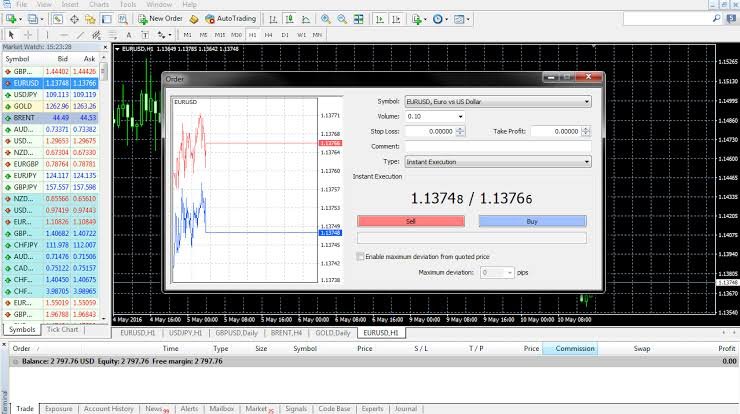
Before placing trades, new users should become familiar with the main sections of the platform. Understanding the interface makes it easier to find important information and use trading tools effectively.
Market Watch Window
The Market Watch window displays available financial instruments and their current bid and ask prices. Beginners can use this section to monitor different currency pairs and observe how prices change throughout the trading session.
Users can customize the displayed instruments by adding or removing currency pairs according to their interests. Selecting a particular instrument also provides access to its chart and trading options.
Navigator Window
The Navigator window organizes important platform resources, including trading accounts, indicators, expert advisors, and scripts. It allows users to access these features without searching through multiple menus.
Beginners can use the Navigator to add technical indicators to charts or explore available automated trading tools.
Terminal Window
The Terminal window provides information about trading activities and account details. It typically includes sections for open trades, account history, alerts, messages, and other relevant information.
Monitoring this window helps beginners understand their account balance, equity, margin, and current trading positions.
Exploring MT4 Charts and Their Functions
Charts are among the most important features of MetaTrader 4 because they help traders understand market movements. Instead of relying entirely on price quotes, users can examine historical and current price activity through visual representations.
Different Chart Types
MT4 provides three primary chart types:
- Bar Charts: Display opening, closing, highest, and lowest prices for a selected period.
- Candlestick Charts: Present price movements through colored candles, making it easier to identify market direction and patterns.
- Line Charts: Connect closing prices over time to provide a simplified view of market trends.
Candlestick charts are particularly popular because they provide detailed information about price behavior in an easy-to-understand format.
Understanding Timeframes
Timeframes determine how much trading activity each individual candle or bar represents. MT4 offers several options, including one-minute, five-minute, fifteen-minute, hourly, four-hour, daily, weekly, and monthly charts.
Shorter timeframes show smaller price movements, while longer timeframes provide a broader perspective of market trends.
Beginners should experiment with different timeframes to understand how price movements change across various trading periods.
Customizing Charts
Traders can customize chart colors, backgrounds, gridlines, and display settings. They can also zoom in or out to examine price movements more closely.
A clean chart layout makes market information easier to interpret. Beginners should avoid adding too many visual elements because excessive information can make analysis confusing.
Essential Technical Indicators in MT4
Technical indicators help traders examine market behavior using mathematical calculations based on historical price data. MT4 includes several built-in indicators that beginners can explore while learning technical analysis.
Moving Average
Moving Average is an indicator that calculates the average price over a selected period. It helps traders identify general market direction by smoothing short-term price fluctuations.
A rising moving average may indicate upward momentum, while a declining line can suggest downward momentum. However, this indicator does not guarantee future price movements.
Relative Strength Index
The Relative Strength Index (RSI) measures the speed and magnitude of recent price changes. Its readings generally range from zero to 100.
Values above 70 are commonly associated with potentially overbought conditions, while readings below 30 may indicate potentially oversold conditions. Traders should consider other market information before making decisions based on RSI.
Moving Average Convergence Divergence
The Moving Average Convergence Divergence (MACD) indicator helps traders examine momentum and potential changes in market direction. It uses moving averages to identify relationships between different price trends.
Beginners can use MACD to study momentum shifts and understand how technical indicators support market analysis.
Understanding Trading Orders in MT4
Learning how to place and manage orders is an essential part of using the platform. MT4 supports different order types that allow traders to enter and exit positions according to their trading strategies.
Market Orders
A market order allows traders to buy or sell an instrument at the available market price. It is commonly used when someone wants to enter a position immediately.
However, the final execution price may differ from the displayed quote because of market conditions and price fluctuations.
Pending Orders
Pending orders allow traders to specify conditions under which a position should be opened automatically. MT4 provides several types, including Buy Limit, Sell Limit, Buy Stop, and Sell Stop.
These orders can help traders plan potential entries without continuously monitoring the market.
Stop Loss and Take Profit
Stop Loss and Take Profit are important order-management tools.
A Stop Loss is designed to close a position when the market reaches a specified unfavorable price level. A Take Profit closes a position when the selected favorable price level is reached.
Using these tools can support risk management, although execution may be affected by slippage and market gaps.
Automated Trading and Expert Advisors
Another useful feature of MT4 is its support for automated trading through Expert Advisors (EAs). These programs follow predefined instructions to analyze markets and execute trading operations.
Expert Advisors can automate certain trading strategies, reducing the need for continuous manual interaction. However, beginners should understand how an EA works before allowing it to manage real funds.
MT4 also supports the MQL4 programming language, which developers use to create custom indicators, scripts, and automated strategies.
Automated trading does not eliminate financial risk. Poorly designed strategies, unexpected market conditions, and technical problems can still result in losses.
Practicing with an MT4 Demo Account
A demo account is one of the most useful resources for anyone following an MT4 beginner guide. It allows new traders to explore platform features using virtual funds instead of risking actual money.
Beginners can practice opening and closing positions, testing indicators, adjusting charts, and experimenting with different order types.
Demo trading also helps users understand spreads, leverage, margin requirements, and market volatility. Spending sufficient time practicing can make the transition to live trading more informed.
However, demo results do not guarantee similar outcomes in real markets, where emotional pressure and execution conditions may differ.
Risk Management Tips for New MT4 Users
Learning platform features is important, but understanding financial risk is equally essential. Forex trading involves leverage and market volatility, which can increase both potential profits and potential losses.
Beginners should consider the following practices:
- Start with a demo account before trading real money.
- Learn how leverage and margin requirements work.
- Use appropriate Stop Loss settings.
- Avoid risking money they cannot afford to lose.
- Maintain a trading journal to review decisions.
- Avoid making emotional decisions after unexpected losses.
- Research brokers and verify their regulatory status.
A disciplined approach can help traders develop realistic expectations and avoid unnecessary mistakes.
Conclusion
MetaTrader 4 provides a range of features that make it a practical platform for learning about forex trading. From customizable charts and technical indicators to different order types and automated trading tools, it offers resources for beginners who want to understand financial markets.
This MT4 beginner guide highlights the importance of learning the platform interface, exploring charting options, understanding trading orders, and practicing through a demo account. New traders should focus on developing their knowledge gradually rather than rushing into live trading.
With consistent practice, careful risk management, and a clear understanding of market behavior, beginners can become more comfortable using MT4. Although no platform can guarantee successful trading results, learning its tools and limitations provides a stronger foundation for making informed trading decisions.